
Avoiding AI for Client Privacy Is Costing You $15K/Year. Here's Your Alternative.
A basic structure behind self-hosted automation + ROI breakdown

Why Self-Host?
You’re a privacy-first type, the kind who believes client strategy discussions are not training data for someone else’s model. But that shouldn’t keep you from taking advantage of AI and saving yourself hours a week. Here, I’ll tell you why this matters and what to do about it. Because this isn’t a theoretical problem.
I’ve seen therapists who refuse to use AI assistants at all for telehealth sessions, simply because the privacy risk is too high. One leak, one vendor policy change, and the room is no longer confidential.
The same goes for certain consulting firms. Their work lives and dies by discretion, so some of them opt out of AI entirely, not because they dislike the tech, but because they can’t afford to let sensitive convos drift into third-party systems.
A couple of weeks ago, I spoke with a founder who made the same choice. His clients are government agencies. Their contracts forbid exposing data to external AI tools. To his understanding, AI was off the table, even when it could have saved him hours and thousands of euros every month.
What he wasn’t yet aware of before we got to talking was that there’s a ridiculously simple way to handle that, even for those who have a 1-2 person team and can’t yet invest in fancy internal AI systems.
Hi, and welcome. If you’re new here, I’m Nicko Stark, an applied AI & biomedical engineering PhD student. I write about thinking clearly in a world rushing to use AI before learning how to reason about it—what these systems can do, where they fail, and how to use them without fooling yourself.
Subscribe to CogniStark: AI Beyond Tools for free to get the posts as they drop.
Let’s First Run the Numbers - I Made You a Calculator
Here I’ll tell you about a simple setup, using self-hosted private call transcription as a use case. But you can use and expand the same setup in various ways depending on your workflows.
Now, if you’ve been reading my stuff, you know for us implementation always comes later. Think in systems, map the problem, quantify the costs and returns, then decide. The how comes after the why. And if you really can't wait, YouTube has approximately 4,000 n8n tutorials ready to kindly overwhelm you.
So let’s first see what you’re leaving on the table without this basic system in play.
You have a client call. You invite Fireflies or similar AI agents like Otter to the call for the recording, transcription, note-taking, etc. Which is fair—you’d like to keep focused on the call rather than frantically take notes.
You’re using Fireflies for 20+ client calls per month. That’s:
$228/year in subscription costs
Client convos feeding an external AI model
“Fireflies.ai has joined the call” killing trust on sensitive topics
Third-party data processor in your compliance chain - because who doesn't love explaining that to an auditor
Depending on your occupation, the projected return on investment (ROI) with this privacy-first system I’m going to talk about ranges between $4K to $31K a year.
To take a better look at the cost analysis interactively, click on the button below. You’ll see the details for 5 different scenarios, including, content creator, consulting firm, private practices like therapies, etc.
Where These Numbers Came From
The calculator opens with default after-call work (ACW) values already set. These are based on industry research, professional benchmarks, and when it comes to content creation and consulting firms, my personal observations. I rounded everything down to keep it conservative and avoid bullshitting you with inflated projections. So these are pretty much realistic numbers, but obviously your mileage may vary depending on your specific workflow. And this basic privacy-first setup hands you back roughly 70% of your time.
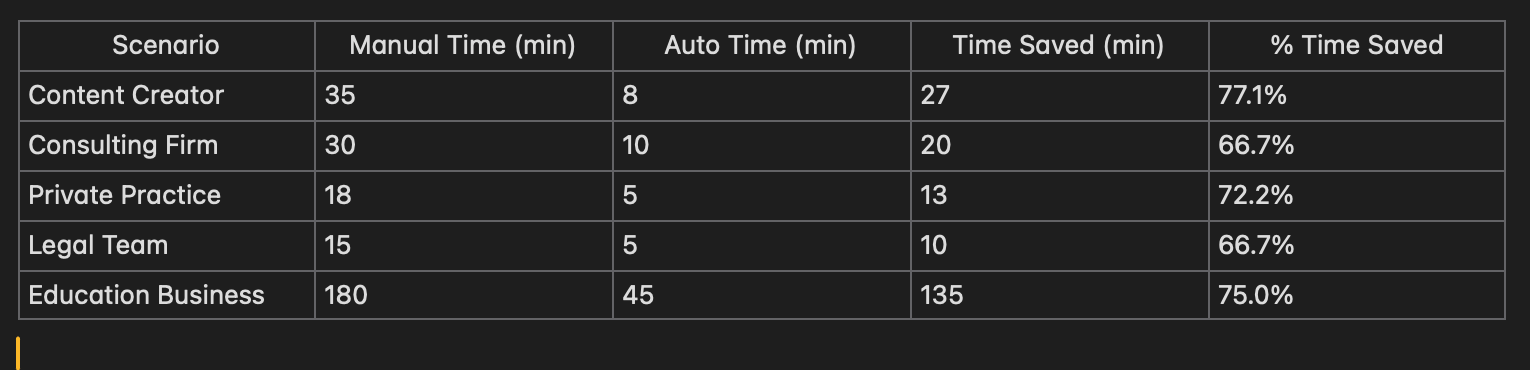
Hourly rates are industry midpoints and recording volumes reflect typical monthly activity for each profession. For VPS (virtual private server) hosting, costs vary across scenarios because there are multiple factors, like:
how many minutes per month you’re transcribing
security/compliance requirements (GDPR/HIPAA for therapy, privileged communications for legal teams)
processing power requirements
storage needs
and stuff like that.
For APIs, I assumed $0.006/min for transcription (Whisper API), and ~$0.019/min for processing steps like, summary, formatting, extraction (say, you do Claude Sonnet or GPT-4).
The Base Architecture: Privacy-First Automation
Alright, let's talk structure.
What you're looking at in the architecture diagram below is the base structure for privacy-preserving AI automation. Let me break down what's happening.
Psst - side question for you:
why did I not call this a ‘process map’ but an 'architecture diagram’?
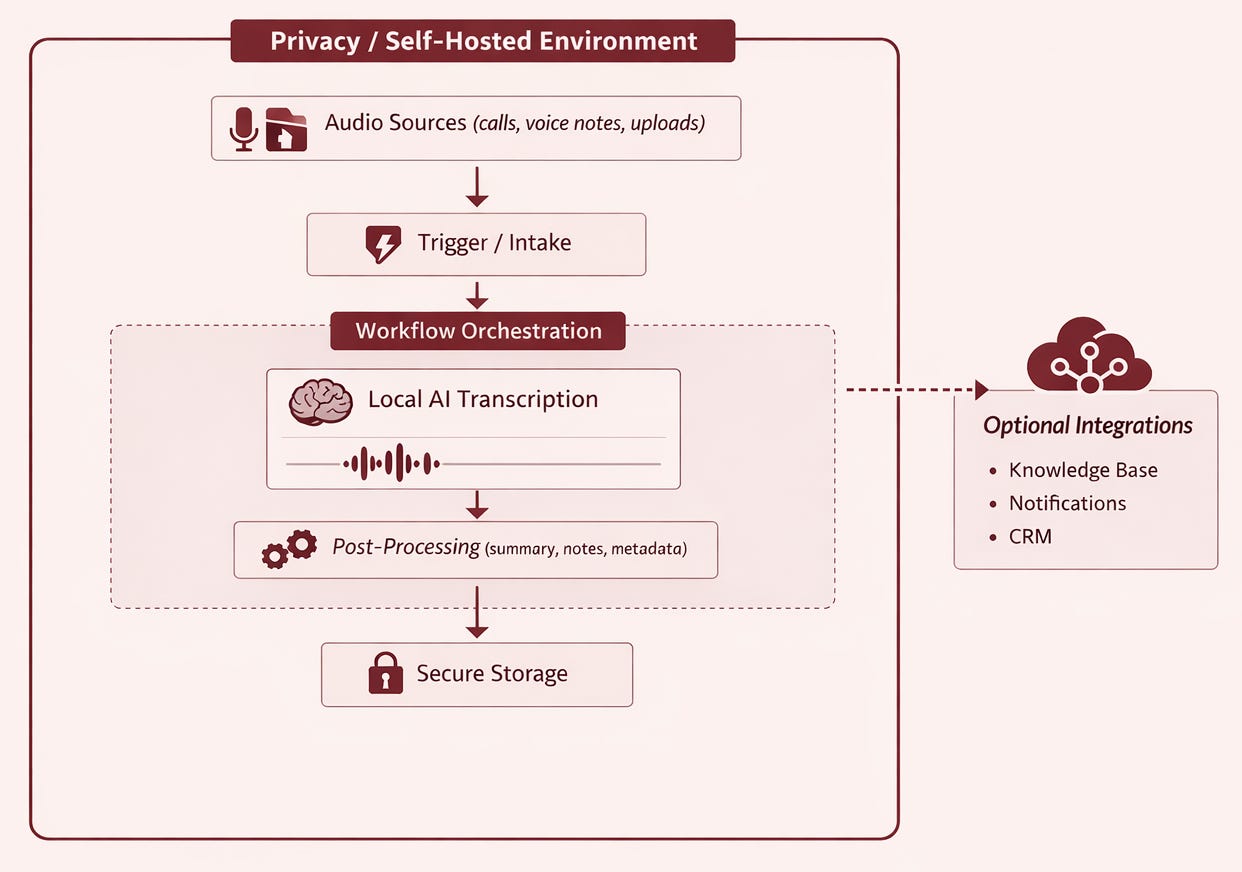
Inside Your Environment (The Box):
Everything happens on infrastructure you control. Audio enters, gets processed, and outputs transcripts; all without leaving your server. This is the critical difference: your data has no reason to touch someone else's system.
The Flow:
Audio Sources → calls, voice memos, uploaded files land in a watched folder
Trigger/Intake → automation detects new files (no manual intervention)
Workflow Orchestration → coordinates the entire process automatically
Local AI Transcription → open-source Whisper model runs on your own hardware (or a VPS)
Post-Processing → summaries, action items, metadata extraction, anything you’d need depending on your workflow
Secure Storage → output files saved, originals deleted
Outside (The Dashed Arrow):
Optional integrations, like Notion, CRM, notifications, etc., happen after transcription, and only if you choose. The core privacy layer is already complete.
Here’s the base workflow in action— where you start:
If you’re enjoying the read, feel free to share it with others.
Workflow Integration: The Expansion Path
You're building infrastructure that compounds. Every workflow you add increases capability without increasing vendor risk. Once the base is running, you can layer on:
Meeting summaries via self-hosted LLM
Action item extraction
Topic tagging and categorization
Generate follow-up email drafts
For Content:
Client call → case study outline
Voice memo → blog posts
Interview → knowledge base article
Now, as I mentioned earlier, the transcription is one use case. It's really not about what you automate. The point is keeping our data in house while saving time and money.
Oh and by the way, I use the very same automation myself almost every day. Doing what?
PhD documentation. When I'm experimenting or working through ideas, I record voice memos in parallel so documentation happens without breaking my flow. The audio drops into the watched folder, n8n picks it up, and I've got a polished transcript waiting for me.
Content creation. Same setup, different output. If I decide something is worth publishing, I run it through an extended version of the automation with this prompt (or its variations) to get social media posts out of it.
Client Calls. After a Zoom call, the recording gets transferred to the watched folder on the server. From there, the recording is transcribed, then the summary and key points are extracted based on criteria I’ve set in separate prompts. Transferring the file can be done:
manually if you're on a free plan
automatically via cloud sync or the Zoom API if you're on a paid account
Final Words
This isn't about whether AI is useful; you already know it is. But if privacy matters to you personally and professionally like it does to me, there are ways you can still take advantage of the tech without needing a DevOps team or a CS degree.
Thanks for reading. Would for sure love to hear how you’re going about this—are you already self-hosting, using third-party tools, or avoiding AI altogether?